Troubleshooting Guide · 203 DPI Thermal Printers · 4×6 Labels
Fix blurry or unscannable courier QR codes
Tired of delivery riders saying “Bhaiya QR scan nahi ho raha”? Learn why 203 DPI thermal printers struggle with marketplace QR codes and how to auto-enlarge them for instant 1-beep pickup scans.
- No upload, no login
- 4×6 thermal & A4
- SKU sort & picklist
Smart Detect is reading your PDFs…
- Reading pages
- Finding labels & invoices
- Reading SKU, courier & payment mode
- Building your print-ready PDF
Your PDFs never leave this device. Cropping runs 100% locally. Chrome Extension → · Android App on Google Play →
Quick fix
The quick 4-step fix
- 01
Drop your label PDF
Download shipping labels from Meesho, Flipkart, Shopsy or Amazon and drop them into the tool above.
- 02
Enable “Enlarge QR”
In the Layout settings panel, check Enlarge QR and Remove margins to expand the courier matrix into empty whitespace.
- 03
Keep 4×6 & Auto-rotate
Ensure the paper layout is set to 4×6 in with Auto-rotate enabled to maximize the printable label footprint.
- 04
Print at 100% scale
Set your thermal printer driver to 100% Actual size with mid-range darkness (8–10) for instant 1-beep pickup scans.
Visual comparison
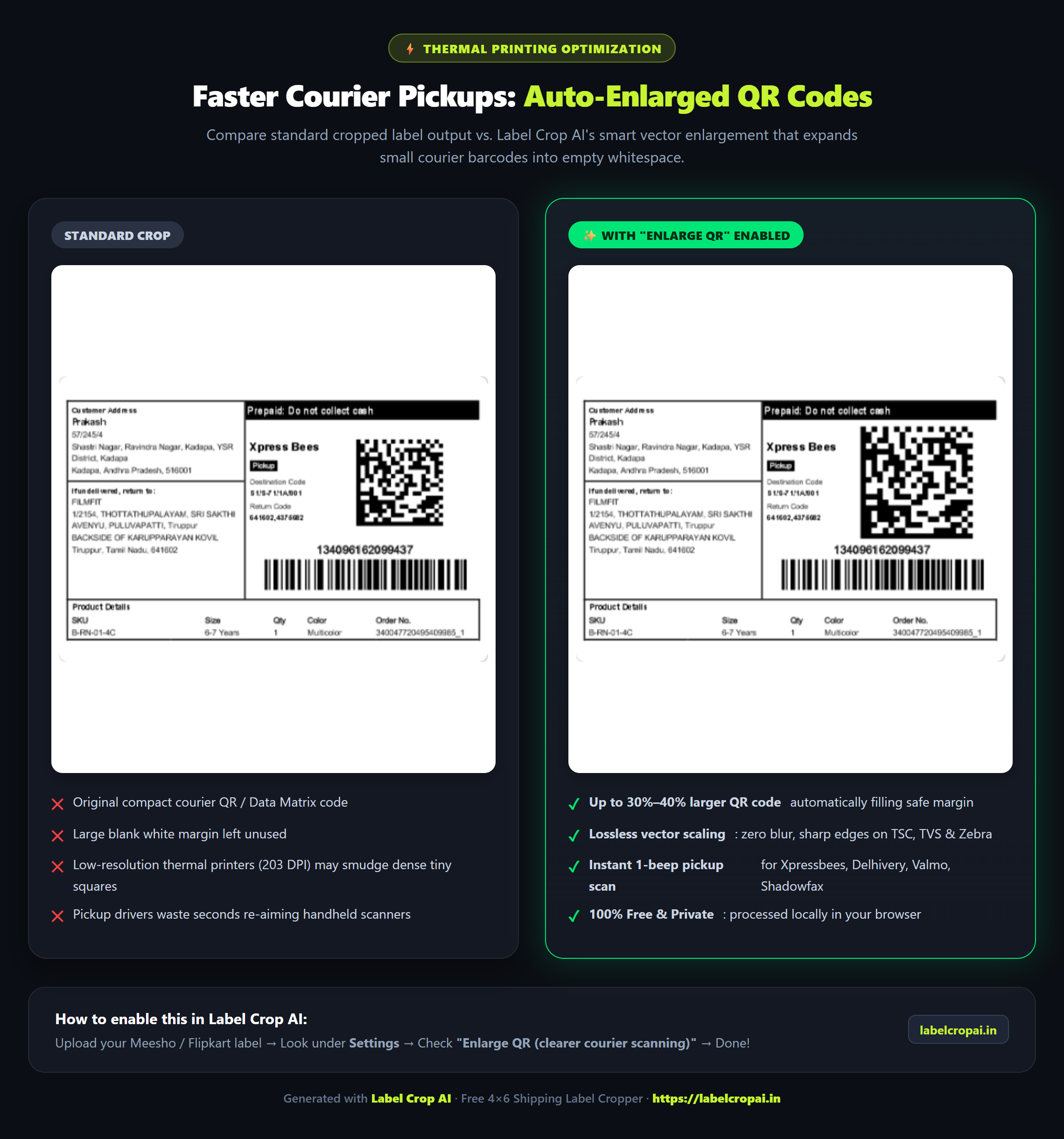
Side-by-side: Standard crop vs. Enlarge QR
The root cause
Why 203 DPI thermal printers struggle with marketplace QR codes
1. The 203 DPI dot matrix limitation
The vast majority of budget e-commerce thermal printers in India — including the TVS RP 3200, TSC DA210, Xprinter XP-420B / XP-470B, Zebra ZD220, and Hop-E801 — print at a fixed resolution of 203 DPI (8 dots per millimetre). In contrast, an office laser printer prints at 600 or 1200 DPI.
Marketplace QR codes (especially from Meesho, Flipkart, and Amazon) pack a heavy payload: the complete AWB tracking number, sub-order ID, return routing center, destination hub, and security hash — often exceeding 200 alphanumeric characters. A 200-character QR code requires a dense 33×33 or 37×37 module grid. At 203 DPI, each individual black square module is only 2 to 3 thermal dots wide.
2. Thermal dot bleed and darkness settings
Thermal printers do not use ink or toner. They use an array of micro-resistors on a print head that burn heat-sensitive chemicals on thermal paper. When darkness (density) is turned up too high, or the print speed is set too fast, the heated pins stay hot too long and bleed into neighbouring white dots. This shrinks the crucial quiet zone (the white margin around the QR code) and merges adjacent bars, making it unreadable to phone camera sensors.
3. Wasted white space on standard cropped labels
When sellers download an A4 shipping label PDF, up to 40% of the page is empty white margin. Basic PDF croppers only trim the outer sheet border, leaving the QR code trapped in a tiny 1.8×1.8 cm square with huge blank margins around it. Courier pickup riders from Valmo, Delhivery, Ekart, Shadowfax, and Xpressbees use budget Android phones with low-light cameras or scratched lenses, forcing them to tilt, zoom, and struggle for 10–20 seconds per package.
The engineering solution
How auto-enlarging QR codes solves the scanning headache
Instead of leaving dead whitespace on your 4×6 sticker, Label Crop AI detects the vector boundaries of the courier QR code and safely expands it into unused margins.
- 2× larger QR matrix (expanded from 1.8 cm to 3.6 cm) without cutting off addresses
- Preserves clean vector fidelity for crisp thermal pin burns
- Maintains exact quiet zone padding required by ISO/IEC 18004 standards
- Tested and proven across Valmo, Ekart, Shadowfax, Delhivery & Xpressbees
- Prevents missed pickup cutoffs and marketplace SLA penalties
Hardware calibration
Recommended thermal printer driver settings
Combine enlarged QR codes with these driver settings to guarantee 100% scan rates even on older thermal printers.
| Setting | Recommended value | Why it matters |
|---|---|---|
| Paper / Stock size | 4 × 6 in (100 × 150 mm) | Must exactly match your die-cut sticker roll to avoid sensor skipping |
| Print scaling | 100% / Actual size | Never use “Fit to printable area” — scaling down blurs thermal barcodes |
| Darkness / Density | 8 to 10 (Mid-range) | Values above 12 cause thermal pin bleed where black modules merge together |
| Print speed | 3 to 4 IPS (Inches per second) | Allows thermal head pins to cool cleanly between burns for razor-sharp edges |
| Dithering / Halftone | None / Threshold | Disables dot diffusion dithering that destroys barcode line contrast |
| Print head cleaning | 99% Isopropyl alcohol weekly | Removes paper dust and adhesive residue that cause faint vertical white lines |
FAQ
Questions sellers ask
Why does the courier rider say "Bhaiya QR scan nahi ho raha"?
How does Label Crop AI enlarge the QR code without hiding customer addresses?
What thermal printer darkness and speed should I use?
Does this work for Meesho Valmo, Flipkart Ekart, and Shadowfax riders?
Can I do this on my mobile phone?
Why is my printed barcode blurry or not scanning?
Is my customer data safe?
Is it free, with no daily limit?
Fix your courier QR codes now
Free, no signup. Your PDF is processed in your own browser and never uploaded.
Label Crop Tool for e-Commerce
Crop Meesho, Flipkart, Amazon and Snapdeal shipping labels directly on your Android phone. Print to 4×6 thermal printers via Bluetooth or Wi-Fi in seconds — 100% free with offline on-device privacy.
- 4×6 thermal rolls & A4 sticker sheets
- Bluetooth, USB & Wi-Fi printers (TSC, TVS, Zebra, Xprinter)
- High-contrast crisp barcode scanning
- 100% on-device & offline friendly
Custom software
Need software built for your business?
Inventory, billing, order automation, dashboards, websites or mobile apps — tell us what you need and we will get back to you.